
Quick Leads-PCBA
💡Access free PCB engineering resources including SMT assembly checklists, SMD component size charts, and PCB BOM templates to support your electronics design and manufacturing.
 Looking for a reliable PCB assembly manufacturer? Turnkey solutions from PCB Manufacturing, Components Sourcing, PCB Assembly to Function Testing.
Silkscreen errors may seem minor, but they often cause major assembly problems. From unreadable labels to missing polarity marks, these mistakes lead to confusion, rework, and even product failure. The good news? Most PCB silkscreen mistakes are easy to prevent with the right design approach.
The most common PCB silkscreen mistakes include placing silkscreen over pads or vias, using unreadable text, missing polarity or component labels, incorrect reference designators, and violating clearance rules. These errors can lead to silkscreen being removed during manufacturing, assembly confusion, or soldering defects. To avoid them, designers should follow standard silkscreen design guidelines, including maintaining at least 4–6 mil clearance, using ≥6 mil line width, and ensuring clear, properly placed markings.
Quick Summary of Common PCB Silkscreen Mistakes
- Silkscreen over pads or vias
- Text too small to read
- Missing polarity markings
- Incorrect reference designators
- Poor clearance and overcrowded layout
Let’s break down these common PCB silkscreen errors, why they happen, and how to fix them before they impact manufacturing and assembly.
Many PCB silkscreen issues can be prevented early with a proper DFM checklist before Gerber export.
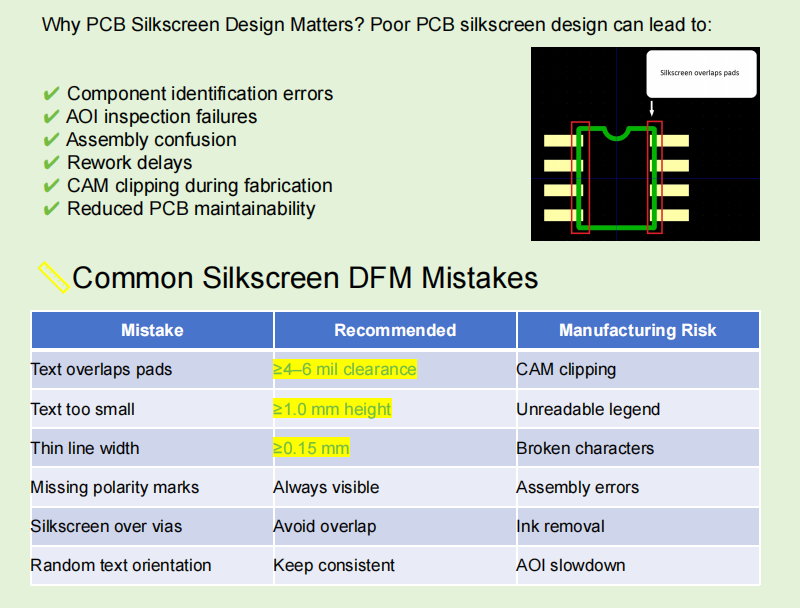
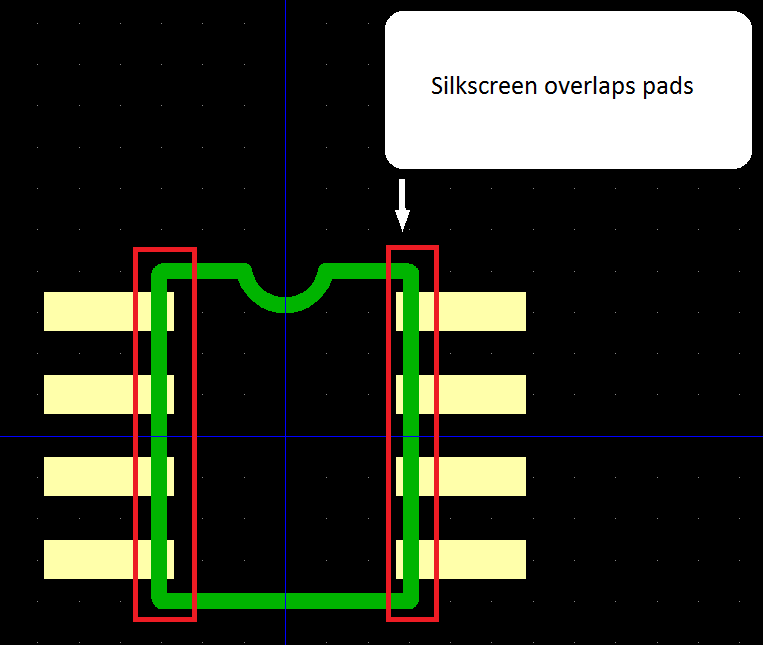
What Happens If Silkscreen Overlaps Pads? (Critical Mistake 🔥)
This is the most critical silkscreen mistake affecting soldering and assembly reliability.
When silkscreen ink is placed too close to or directly on pads, it violates clearance rules (typically ≥4–6 mil). During fabrication, manufacturers will automatically clip or remove the silkscreen to protect solderability.
But if ink remains partially, it can interfere with solder wetting during reflow. This leads to:
- Cold solder joints
- Weak electrical connections
- Assembly defects that are hard to diagnose
In real production, this often shows up as inconsistent yield—some boards pass, others fail without obvious design errors.
How to fix it:
- Maintain ≥4–6 mil clearance from pads and exposed copper
- Run DRC checks before Gerber export
- Follow proven PCB silkscreen design guidelines
Incorrect or Missing PCB Silkscreen Symbols
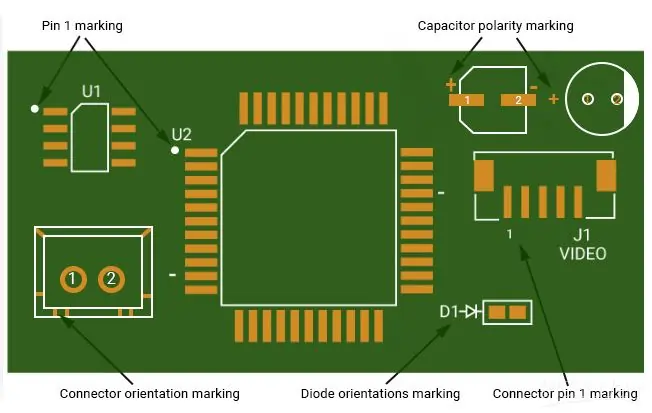
Clear PCB silkscreen symbols help assembly operators identify components quickly and reduce production errors. Missing or incorrect symbols can lead to incorrect installation, longer inspection time, and higher rework costs.
Common PCB silkscreen symbols include:
- Pin 1 indicator – Shows the correct IC orientation.
- Test point labels (TP1, TP2) – Help engineers during testing.
- Connector direction marks – Prevent incorrect cable insertion.
- Warning symbols – Identify high-voltage or ESD-sensitive areas.
- Board logo and revision – Improve product traceability.
Tip: Keep all PCB legend symbols clear and away from pads or component bodies so they remain visible after assembly.
What Are Common PCB Silkscreen Mistakes?
If you’re new to PCB design—or scaling into production—it helps to understand the full scope of issues.
Common PCB silkscreen problems include:
- Overlapping silkscreen and pads
- Unreadable or undersized text
- Missing functional markings (polarity, pin 1, etc.)
- Incorrect or inconsistent reference designators
- Silkscreen clipped during CAM processing
If you need a refresher, here’s a helpful overview of what is silkscreen on PCB and why it matters in both assembly and maintenance.
What Is the Minimum Font Size for PCB Silkscreen?
A frequent PCB silkscreen readability issue is using text that’s simply too small.
Recommended values:
- Minimum text height: ≥0.8–1.0 mm
- Minimum line width: ≥6 mil
Anything smaller may look fine in CAD but becomes unreadable after fabrication—especially with lower-cost printing processes.
Why it matters:
- Assembly technicians rely on labels for placement
- Debugging becomes harder without clear identifiers
- AOI (Automated Optical Inspection) may fail to detect components correctly
A common real-world issue: engineers shrink text to fit tight layouts, only to find it completely illegible on the final board.
Unit Circuits: Leading PCBA Manufacturer
 ISO-certified & 8+ years of PCBA Low MOQ & Fast Turnaround Prototype & Mass production
Limited Time Offer:
Get $100 off your order TODAY!
sales@unitcircuits.com
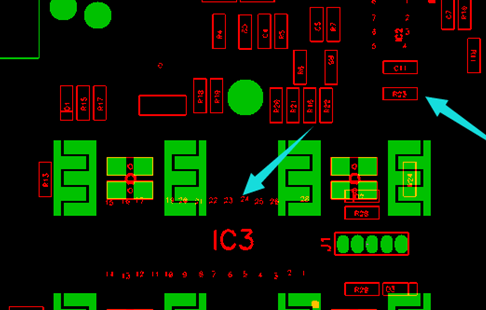
Why Is Silkscreen Removed During PCB Manufacturing?
If your PCB comes back with missing labels, it’s usually not a factory mistake—it’s a design issue.
During CAM processing, manufacturers enforce design rules:
- Silkscreen over pads → removed
- Silkscreen too close to vias → clipped
- Violations of clearance → automatically adjusted
This ensures manufacturability but can remove critical information.
Result:
- Missing reference labels
- Lost polarity indicators
- Confusion during assembly
This is one of the most common PCB silkscreen clearance issues affecting production quality.
Can Silkscreen Affect Soldering?
Yes—and this is often underestimated.
Silkscreen ink is non-conductive and not designed for solder interaction. If it contaminates pads:
- Solder may not wet properly
- Joints may become unreliable
- Long-term failures can occur
This is why “silkscreen over pads problem” is heavily emphasized in DFM checks.
For a deeper comparison of layers, see PCB silkscreen vs solder mask.
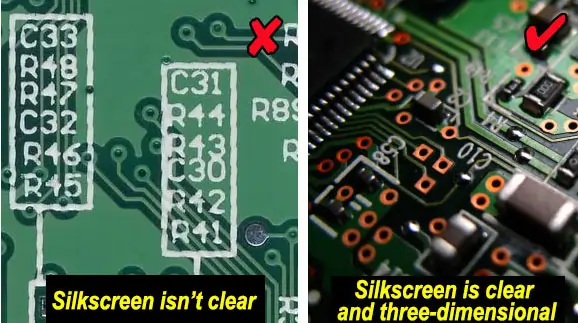
Why Is My PCB Silkscreen Not Visible After Fabrication?
Another common frustration: the silkscreen appears faint, broken, or completely missing.
Typical causes:
- Line width below 6 mil
- Poor contrast with solder mask color
- Overlapping elements removed during fabrication
For example, white silkscreen on a yellow mask may reduce readability, especially under certain lighting conditions.
How to prevent this:
- Use standard line widths
- Choose high-contrast color combinations
- Avoid placing silkscreen near copper features
Missing Polarity or Component Labels (High Risk)
This is not just a design issue—it’s a production risk.
Missing polarity indicators on:
- Diodes
- Electrolytic capacitors
- IC pin 1 markers
can lead to incorrect placement during assembly.
Real-world impact:
- Boards assembled with reversed components
- Functional failure during testing
- Costly rework or scrapped batches
Clear labeling is one of the primary functions explained in what is PCB silkscreen used for.
Why Is Silkscreen Clipped by Solder Mask?
If part of the silkscreen disappears after manufacturing, it is usually because it overlaps a solder mask opening or exposed pad.
Common reasons include:
- DRC (Design Rule Check): The manufacturer removes silkscreen that violates design rules.
- Solder mask openings: Ink cannot be printed over exposed pads.
- Gerber auto clipping: CAM software automatically trims overlapping silkscreen before production.
To avoid this issue, leave enough silkscreen-to-solder-mask clearance and review your Gerber files before fabrication.
Learn more in our guide: PCB Silkscreen vs. Solder Mask.

Incorrect Reference Designators
Reference designators (R1, C5, U2, etc.) are essential for:
- Assembly
- Testing
- Debugging
Errors here create confusion across teams.
Common issues:
- Missing designators
- Mismatched schematic vs PCB labels
- Overlapping or unreadable placement
In production environments, this slows down troubleshooting and increases error rates.
Font and Line Width Problems in Silkscreen
Silkscreen printing has physical limitations.
If your design uses:
- Line width <6 mil
- Decorative or complex fonts
you risk losing detail during fabrication.
Best practices:
- Stick to simple, standard fonts
- Maintain ≥6 mil line width
- Avoid excessive stylization
Thin strokes often break or disappear entirely, leading to poor PCB silkscreen readability.
FAQs
1. Do PCB manufacturers fix silkscreen mistakes automatically?
No—PCB manufacturers do not “fix” PCB silkscreen mistakes; they only adjust designs to meet fabrication limits. For example, silkscreen overlapping pads will be clipped or removed, not corrected. This can result in missing labels or markings. To avoid issues, designers must follow PCB silkscreen design rules and perform DFM checks before submission.
2. Does silkscreen color affect PCB readability?
Yes, silkscreen color plays a major role in PCB silkscreen readability. High-contrast combinations (e.g., white silkscreen on green or black solder mask) are easiest to read. Low-contrast combinations can make labels difficult to see during assembly and inspection, increasing the risk of human error.
3. Can poor silkscreen design delay PCB assembly?
Absolutely. PCB silkscreen errors such as unclear labels, missing markings, or confusing layouts can slow down assembly and inspection processes. Technicians may need extra time to verify component placement, which increases production time and cost—especially in high-volume manufacturing.
4. What file format is required to ensure accurate PCB silkscreen printing?
Standard Gerber files (RS-274X or newer) are required for accurate PCB silkscreen printing. These files define silkscreen layers, text, and placement. Errors in Gerber export—such as incorrect layer mapping or missing silkscreen data—can lead to PCB silkscreen problems during fabrication. Always review Gerbers before sending them to your manufacturer.
5. Can silkscreen overlap solder pads?
No. PCB silkscreen should not overlap exposed solder pads, test points, or other solderable areas. If silkscreen extends into these regions, manufacturers may automatically remove or clip the ink during CAM processing. Keeping adequate silkscreen-to-pad clearance helps maintain good solderability and ensures all markings remain readable after fabrication.
6. What happens if PCB silkscreen text is too small?
If PCB silkscreen text is too small, it may become blurred, incomplete, or unreadable after printing. Small characters are also more likely to be clipped during manufacturing. To improve readability, choose an appropriate PCB silkscreen text size and confirm that it meets your manufacturer's printing capabilities before production.
7. What is the minimum PCB silkscreen line width?
There is no single standard PCB silkscreen line width for all manufacturers. The minimum printable line width depends on the printing process, equipment, and production tolerances. Always follow your PCB manufacturer's design capabilities and perform a final design rule check (DRC) to ensure all silkscreen markings can be printed clearly.
8. How do I check PCB silkscreen before manufacturing?
Before sending your design for production, review the PCB silkscreen layer in your Gerber files. Check that text is readable, polarity marks and reference designators are correct, and no silkscreen overlaps pads or solder mask openings. Running a final Design Rule Check (DRC) helps identify potential issues before manufacturing begins.
Have Specific Requirements?
Looking for high-precision PCB assembly for your products? Our team specializes in delivering top-tier assembly services, ensuring your devices perform flawlessly in any environment. Contact us today for a free consultation on how we can enhance your product’s reliability.
Layer Confusion: Top vs Bottom Silkscreen Errors
This mistake is more common than expected—especially in multi-layer or mirrored designs.
Issues include:
- Mirrored text on bottom layer
- Incorrect orientation
- Labels placed on the wrong side
Impact:
- Assembly errors
- Technician confusion
- Increased inspection time
Always verify orientation in your CAD tool and exported files.
Overcrowded Silkscreen Layout
Trying to include too much information can backfire.
Overcrowded silkscreen leads to:
- Visual clutter
- Reduced readability
- Increased chance of overlap and clipping
A clean layout improves:
- Assembly speed
- Inspection accuracy
- Repair efficiency
Think of silkscreen as a communication tool—not a data dump.
How Do Silkscreen Mistakes Affect PCB Assembly Yield?
Silkscreen errors don’t just look bad—they directly impact yield.
Common consequences:
- Increased assembly errors
- Higher rework rates
- Slower production cycles
- Misplaced or reversed components
In high-volume manufacturing, even small silkscreen issues can lead to significant cost increases.
For OEM/EMS buyers, this directly affects:
- Time-to-market
- Production efficiency
- Overall product reliability
How to Check Silkscreen Issues Before Manufacturing (DFM Guide)
Preventing PCB silkscreen mistakes starts with proper DFM (Design for Manufacturability).
Key steps:
1. Run DRC Checks
Ensure:
- ≥4–6 mil clearance from pads
- Proper spacing between elements
- No overlap with vias or copper
2. Align with Manufacturer Capabilities
Not all fabs support the same limits.
Confirm:
- Minimum text size
- Line width capability
- Silkscreen resolution
3. Review Gerber Files Carefully
Before submission:
- Check for clipped or missing elements
- Verify layer orientation
- Confirm readability
4. Follow Proven Guidelines
Use established PCB silkscreen design guidelines to avoid preventable errors.
Final Thoughts
PCB silkscreen mistakes can quietly undermine assembly quality and product reliability. By following proper design rules, maintaining clear markings, and performing DFM checks, you can eliminate costly errors and ensure smooth manufacturing.
PCB Silkscreen Mistakes Checklist
| Mistake | Risk | Quick Fix |
|---|---|---|
| Silkscreen on Pads | 🔴 High | Keep away from exposed pads |
| Text Too Small | 🟠 Medium | Increase text size |
| Line Width Too Thin | 🟠 Medium | Follow manufacturer capability |
| Missing Polarity Marks | 🔴 High | Add clear polarity symbols |
| Wrong Reference Designators | 🔴 High | Verify against BOM |
| Overcrowded Layout | 🟠 Medium | Increase spacing |
| Wrong Silkscreen Layer | 🔴 High | Check Top/Bottom layers |
| Missing Board Revision | 🟢 Low | Add revision information |
| Missing PCB Symbols | 🟠 Medium | Add Pin 1 & test point marks |
| Silkscreen Clipped | 🟠 Medium | Increase clearance |
Save on your next PCB project?
Claim $100 OFF your order today.
sales@unitcircuits.com
✅ high-quality PCB assembly with strict quality control ✅ ISO-certified & 8+ years of experience. ✅ Low MOQ, fast turnaround, and 100% E-tested PCBs.
Related PCB Silkscreen Topics:
Request for Quote
sales@unitcircuits.com
RECENT POSTS
What Are PCB Silkscreen Design Guidelines? (Clearance, Font Size & DFM Rules Explained)
Learn PCB silkscreen design guidelines, including font size, clearance, and DFM rules. Improve readability, prevent
What Is PCB Silkscreen Used For? Functions, Symbols & Practical Examples
Learn what PCB silkscreen is used for, including symbols, functions, and real applications. Improve assembly
RELATED POSTS
Leading PCBA Manufacturer
✅ Assemble 20 PCBAS for $0 ✅ Get $100 OFF – Risk-Free Trial!
sales@unitcircuits.com
✅ 100+ Satisfied Customers
✅ Ensured Quality & On-Time Delivery
✅ Free Trial, No Commitments!