86-0755-23577855

sales@unitcircuits.com

Mon-Sat 24 hours

What Is PCB Silkscreen Used For? Functions, Symbols & Practical Examples

Date:

2026-04-27

Author:

Della Tan

Theme:

PCB Manufacturing

Quick Leads-PCBA

💡Access free PCB engineering resources including SMT assembly checklists, SMD component size charts, and PCB BOM templates to support your electronics design and manufacturing.

💡Looking for a reliable PCB assembly manufacturer? Turnkey solutions from PCB Manufacturing, Components Sourcing, PCB Assembly to Function Testing.
Introduction

PCB assembly errors often come down to one simple issue: unclear component identification. When labels, polarity, or reference markers are missing or confusing, it slows production and increases costly mistakes. That’s where PCB silkscreen comes in—providing a clear visual guide that improves accuracy, efficiency, and reliability.


What Is PCB Silkscreen? 

PCB silkscreen is a non-conductive ink layer printed on the surface of a printed circuit board that displays component labels, symbols, polarity markings, and identifiers to support accurate assembly, inspection, and maintenance. It plays a critical role in communicating design intent to engineers, technicians, and manufacturers, often using standardized PCB silkscreen symbols for clarity.


Understanding the Role of Silkscreen in PCB Design

Now that we’ve defined it, let’s look at how silkscreen actually functions in real PCB production and why it matters beyond simple labeling.

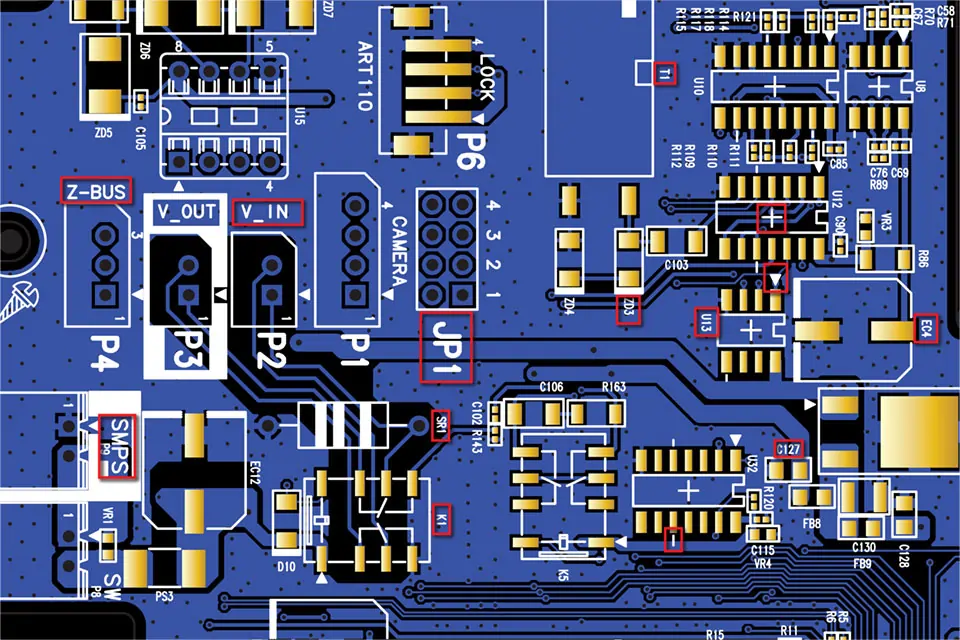
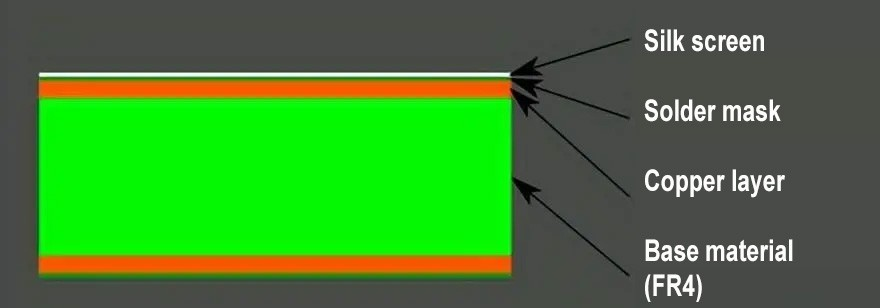
PCB silkscreen layer showing font size and clearance over solder mask and pads
PCB layer structure silkscreen solder mask

What Is a Silkscreen in PCB?

A silkscreen in PCB refers to the top (and sometimes bottom) printed layer of ink used to display essential information directly on the board. Unlike copper layers, it does not conduct electricity.

This layer typically includes:

  • Component reference designators (R1, C2, U3)
  • Polarity indicators
  • Logos and board identifiers
  • Test point labels

The ink used—commonly called PCB silkscreen ink—is designed to withstand heat, chemicals, and assembly processes while remaining readable.

If you want a deeper breakdown, you can explore this detailed guide:👉 What Is Silkscreen on a PCB?

What Is PCB Silkscreen Used For?

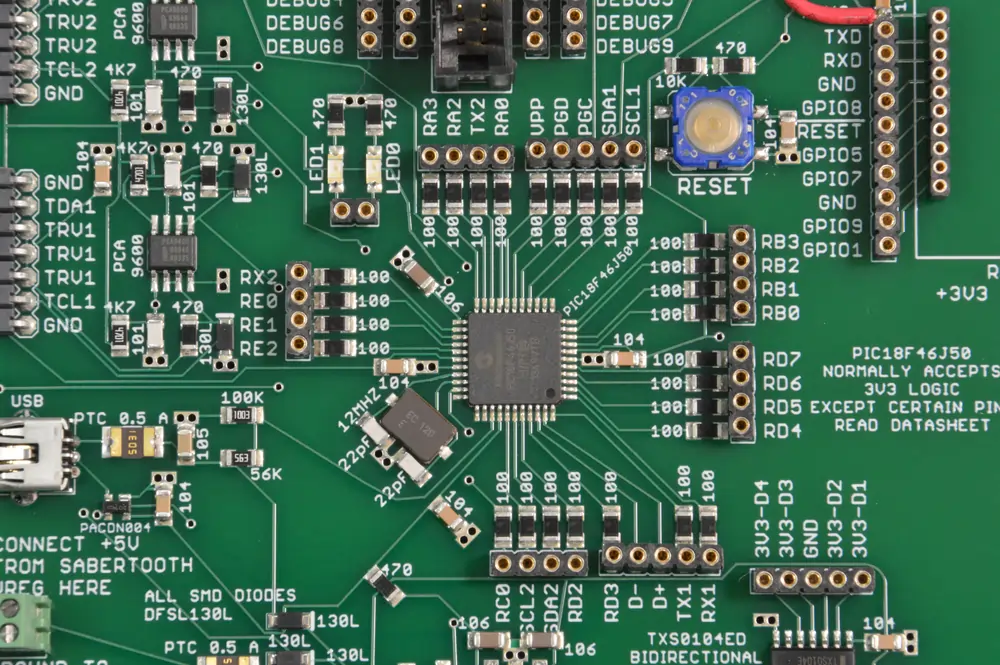
Component Identification

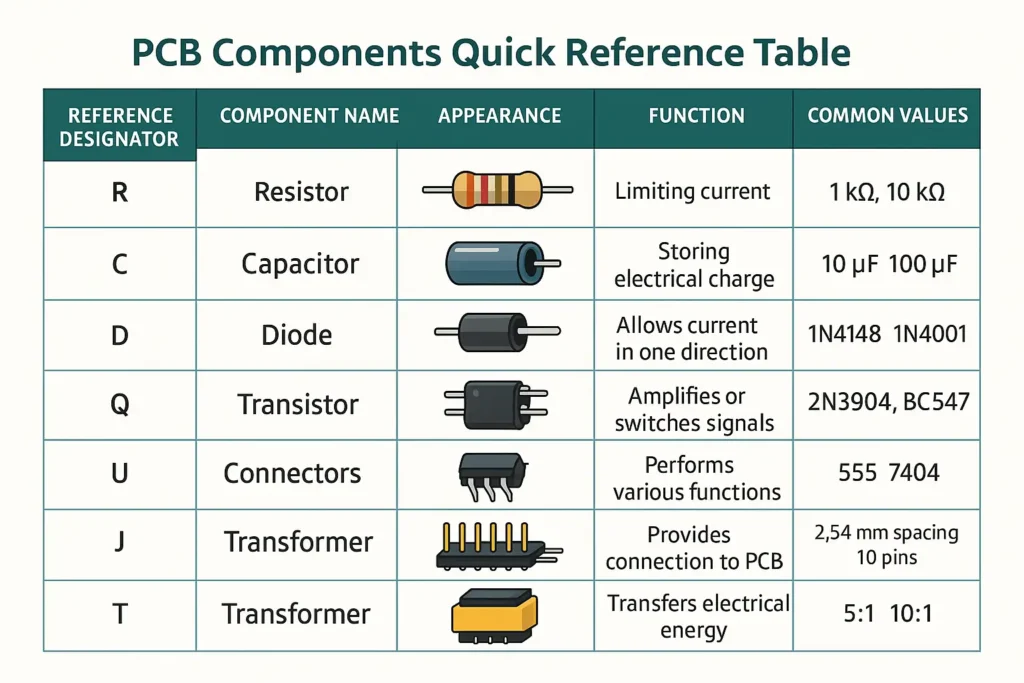
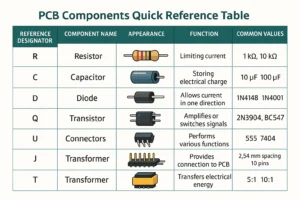
Silkscreen clearly labels each component using standardized reference designators:

  • R = Resistor
  • C = Capacitor
  • U = Integrated Circuit
  • D = Diode

This ensures engineers and assembly technicians can quickly identify parts without referring constantly to schematics.

pcb silkscreen labels components
PCB silkscreen labels components

Polarity & Orientation Marking

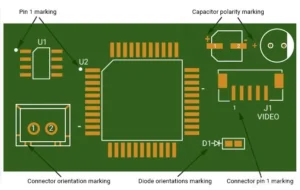
Correct orientation is critical for many components. Silkscreen provides:

  • Pin 1 indicators for ICs
  • “+” and “–” signs for capacitors
  • Diode direction markings

These markings significantly reduce assembly errors.


Assembly Guidance

In high-volume manufacturing (OEM/EMS environments), silkscreen acts as a visual instruction layer.

It helps:

  • Speed up component placement
  • Reduce reliance on external documentation
  • Minimize human error

A reliable PCB manufacturer ensures clear and accurate silkscreen, which directly improves assembly efficiency.


Testing & Debugging Support

Silkscreen labels test points and signals, making it easier to:

  • Probe circuits during testing
  • Diagnose faults
  • Perform rework

This is especially valuable during prototyping and validation stages.


Branding & Compliance Information

Silkscreen is also used for:

  • Company logos
  • PCB version numbers
  • Certification marks

While not functional electrically, these elements are important for product tracking and branding.

Unit Circuits: Leading PCBA Manufacturer
✅ ISO-certified & 8+ years of PCBA
✅ Low MOQ & Fast Turnaround
✅ Prototype & Mass production
Limited Time Offer:
Get $100 off your order TODAY!
This offer won’t last long! Today ONLY!
[Hurry! Only 50 discounts left]

sales@unitcircuits.com

common PCB silkscreen symbols chart including resistor capacitor IC and polarity marks
PCB silkscreen symbols chart

What Do PCB Silkscreen Symbols Mean?

PCB silkscreen symbols are simplified markings used to identify components and guide assembly. They differ from schematic symbols but serve a practical, physical-world purpose.

Quick Reference: Common PCB Silkscreen Symbols

  • R = Resistor
  • C = Capacitor
  • U = Integrated Circuit (IC)
  • D = Diode
  • Q = Transistor
  • L = Inductor
  • + / – = Polarity
  • Dot / Notch = Pin 1 indicator

These symbols make it easy to understand board layout at a glance—especially during assembly or repair.


Why Is Silkscreen Important in PCB Assembly?

Silkscreen plays a critical role in manufacturing efficiency and product quality.

Key Benefits:

  • Faster assembly: Technicians can quickly identify and place components
  • Reduced errors: Clear markings prevent incorrect orientation
  • Improved inspection: Easier visual verification of assembled boards
  • Lower costs: Fewer mistakes mean less rework and scrap

From an OEM/EMS perspective, good silkscreen design directly impacts production speed and consistency.

Proper silkscreen design improves manufacturability and reduces rework—making it a small detail with a big impact.


What Happens If Silkscreen Is Missing?

Without silkscreen, even a well-designed PCB becomes harder to use and manufacture.

Common Issues:

  • Assembly confusion and delays
  • Increased error rates
  • Higher labor costs
  • Difficult debugging and maintenance

In complex boards, missing silkscreen can significantly slow down both production and field service.

PCB assembly process using silkscreen for component placement and inspection
PCB assembly line inspection silkscreen

Practical Examples of PCB Silkscreen in Use

1. SMT Assembly Line

Operators rely on silkscreen to verify component placement quickly. Even with automated systems, clear markings support manual checks and rework.


2. Field Repair & Maintenance

Technicians use silkscreen labels to identify faulty components without needing full schematics, speeding up repairs.


3. Prototyping & Debugging

Engineers depend on labeled test points and components to troubleshoot issues efficiently during development.

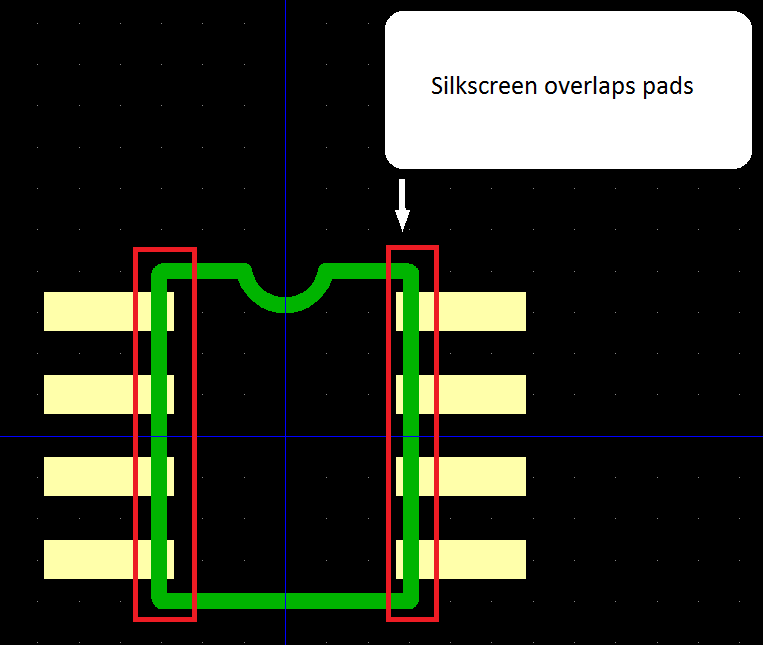
PCB silkscreen mistakes showing overlapping pads and poor text readability vs correct design
PCB silkscreen errors overlapping pads

Common PCB Silkscreen Mistakes to Avoid

Even though silkscreen seems simple, poor design can cause real problems.

Typical Mistakes:

  • Placing text over pads or vias
  • Using fonts that are too small to read
  • Missing polarity or pin 1 indicators
  • Overcrowding the board with markings

While detailed PCB silkscreen guidelines are a separate topic, avoiding these basics already improves clarity and manufacturability.


PCB Silkscreen vs Solder Mask (Quick Comparison)

Feature PCB Silkscreen Solder Mask
Purpose Information & labeling Protection & insulation
Material Ink (non-conductive) Polymer coating
Function Visual guidance Prevents solder bridges
Electrical Role None Insulates copper traces
Visibility Text and symbols Usually solid color (green, etc.)
👉 Learn more about PCB Silkscreen vs Solder Mask here.

FAQs

To ensure readability, follow basic PCB silkscreen guidelines such as using sufficient font size (typically ≥1.0 mm), maintaining proper spacing, and avoiding overlap with pads or vias. Also consider the limitations of the PCB silkscreen printer and ink resolution. Working with an experienced manufacturer helps ensure your PCB silkscreen ink remains clear after soldering and cleaning processes.

Yes, poor silkscreen design can increase both cost and production time. Missing or unclear PCB silkscreen symbols may lead to assembly errors, manual corrections, or additional inspection steps. Clear and accurate silkscreen reduces operator confusion, improves placement speed, and minimizes rework—making it an important factor in efficient OEM/EMS production.

Even in automated assembly, PCB silkscreen remains valuable. While machines rely on design files, human operators still use silkscreen for setup, verification, and quality checks. It also supports debugging and maintenance after production. For complex boards, clear silkscreen in PCB design improves overall workflow and reduces dependency on external documentation.

PCB silkscreen is typically defined in Gerber files, which include separate layers for top and bottom silkscreen. These files specify all text, PCB silkscreen symbols, and markings to be printed. Ensuring accurate Gerber data is essential, as any errors can directly impact board labeling, assembly clarity, and final product quality.

Have Specific Requirements?

Looking for high-precision PCB assembly for your products? Our team specializes in delivering top-tier assembly services, ensuring your devices perform flawlessly in any environment. Contact us today for a free consultation on how we can enhance your product’s reliability.

Manufacturing Considerations (DFM Insights)

From a production standpoint, silkscreen must be designed within manufacturing constraints.

Key Factors:

  • PCB silkscreen thickness affects readability and durability
  • Ink must survive soldering temperatures
  • PCB silkscreen printer resolution limits text size and detail
  • Placement must avoid pads and critical areas


A well-designed silkscreen ensures that information remains clear throughout the entire product lifecycle.


Summary

PCB silkscreen is more than just printed text—it’s a critical communication layer that supports assembly, inspection, and maintenance. From reducing errors to improving efficiency, its impact spans the entire manufacturing process, making it essential for both engineers and OEM decision-makers.

Save on your next PCB project?

Claim $100 OFF your order today.

sales@unitcircuits.com

✅ high-quality PCB assembly with strict quality control ✅ ISO-certified & 8+ years of experience. ✅ Low MOQ, fast turnaround, and 100% E-tested PCBs.

Request for Quote

sales@unitcircuits.com

RECENT POSTS
Leading PCBA Manufacturer

✅ Assemble 20 PCBAS for $0 ✅ Get $100 OFF – Risk-Free Trial!

sales@unitcircuits.com

✅ 100+ Satisfied Customers

✅ Ensured Quality & On-Time Delivery

✅ Free Trial, No Commitments!

Leading PCBA Manufacturer

✅ Assemble 20 PCBAS for $0 ✅ Get $100 OFF – Risk-Free Trial!